
What's new in One Big Green: edition April 2026

A new One Big Green update is here.
This release is all about making your day-to-day work easier, clearer, and a bit more automated. You can now send clean, professional service reports to customers without lifting a finger, break down complex services into flexible schedules with Service Nicknames, and get a much clearer view of your planning directly in the Service Site List. We also added a smoother way to link replacements to deliveries and made it faster to bring new team members into the system.
The result is simple: less manual work, fewer surprises, and more control over how your service runs in the field.
Let’s take a look at what’s new. 👇
Show your work:
Turn your visits into professional reports your customers receive automatically
We are really excited about this one.
You can now automatically send branded service visit and delivery reports directly to your customers. After each visit or delivery, One Big Green generates a clean, professional PDF and emails it to the right contacts. No extra work, no copy-paste, no chasing.
You stay fully in control. Choose who receives the reports, customize the cover message, decide what gets included, and pick between automatic sending or manual approval. Set it per customer, so larger accounts can receive detailed reports while others get a simpler summary. Or the other way around, if you prefer – the choice is yours.
It is a simple change, but it makes a big difference. Your customers clearly see what was done, when it was done, and the value you are delivering. It also makes your service look structured, transparent, and highly professional.
We recorded a detailed instructional video that shows the full setup and a few real examples, so you can get this running in just a couple of minutes. 👇
Our suggestion: start in manual mode, send a few reports, tweak the layout and contents, and once you are happy, switch to automatic and let it run in the background.
Give it a try!
This is one of those features that quietly upgrades your entire service experience.
Service Nicknames are here - split one service into multiple schedules
You can now divide a single service into clearly defined parts using Service Nicknames.
This makes it possible to manage complex accounts without creating extra services or duplicating inventory.
Here is how it works.
A site still has one service, for example, Interior. But inside that service, you can now create nicknamed segments like Living Wall, Floor Plants, Reception, or Atrium.
Each nickname remains part of the same service while behaving like its own operational block.
A nicknamed service block can have:
its own schedule
its own technician
its own supervisor
its own set of displays
If no nickname is specified, everything will automatically fall under All service site, so nothing changes for simple accounts.
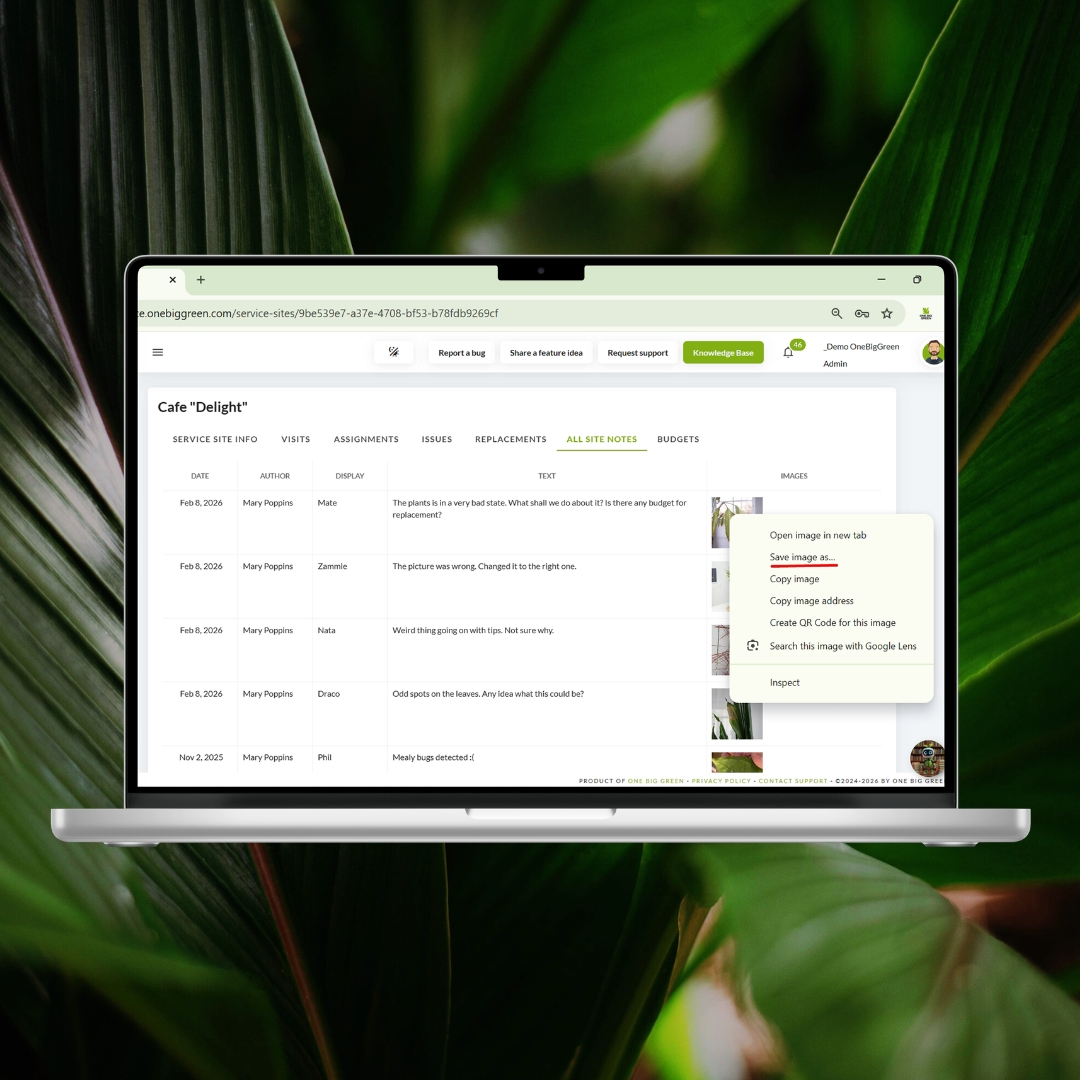
And here’s an updated video on the One Big Green data structure, showing how the new service blocks fit into the overall architecture:
This update opens up a lot of practical use cases:
Service living walls weekly and floor plants biweekly
Assign specialists to complex installations only
Split large buildings into logical service blocks
Service different departments on different days
Phase work for large accounts without creating extra services
The big advantage is clarity without complexity. You keep one clean service per site, but gain the flexibility to run it like multiple coordinated programs. Scheduling becomes more precise, technician accountability improves, and large accounts become much easier to manage.
Service Nicknames are especially powerful for customers with living walls, large campuses, multi-floor offices, or mixed service frequencies. They also work great for simply separating high-touch areas from standard maintenance.
It is a small structural change that unlocks much more flexible scheduling and cleaner operational control.
Smarter Service Site List - scheduling visibility at a glance
We reworked the Service Site List to give you clearer insight into what is actually scheduled and what still needs attention. The list now includes Service Nicknames and directly highlights potential scheduling issues, so you can spot problems without opening each site or digging through the Operational calendar.
Service Nicknames now appear right in the list, making it easier to understand how work is split within each service. You can immediately see which parts of the service are scheduled, which are not, and how the workload is structured across the account.
The updated list also helps you identify services that are not included in your company schedule. When something is missing, you can add it directly from the Service Site List without navigating into the service setup. This makes scheduling faster, especially when reviewing large portfolios.
In addition, the system now flags three common scheduling issues:
Service has no upcoming visits
Services that have multiple active visit series
Services where the scheduled frequency does not match the configured frequency
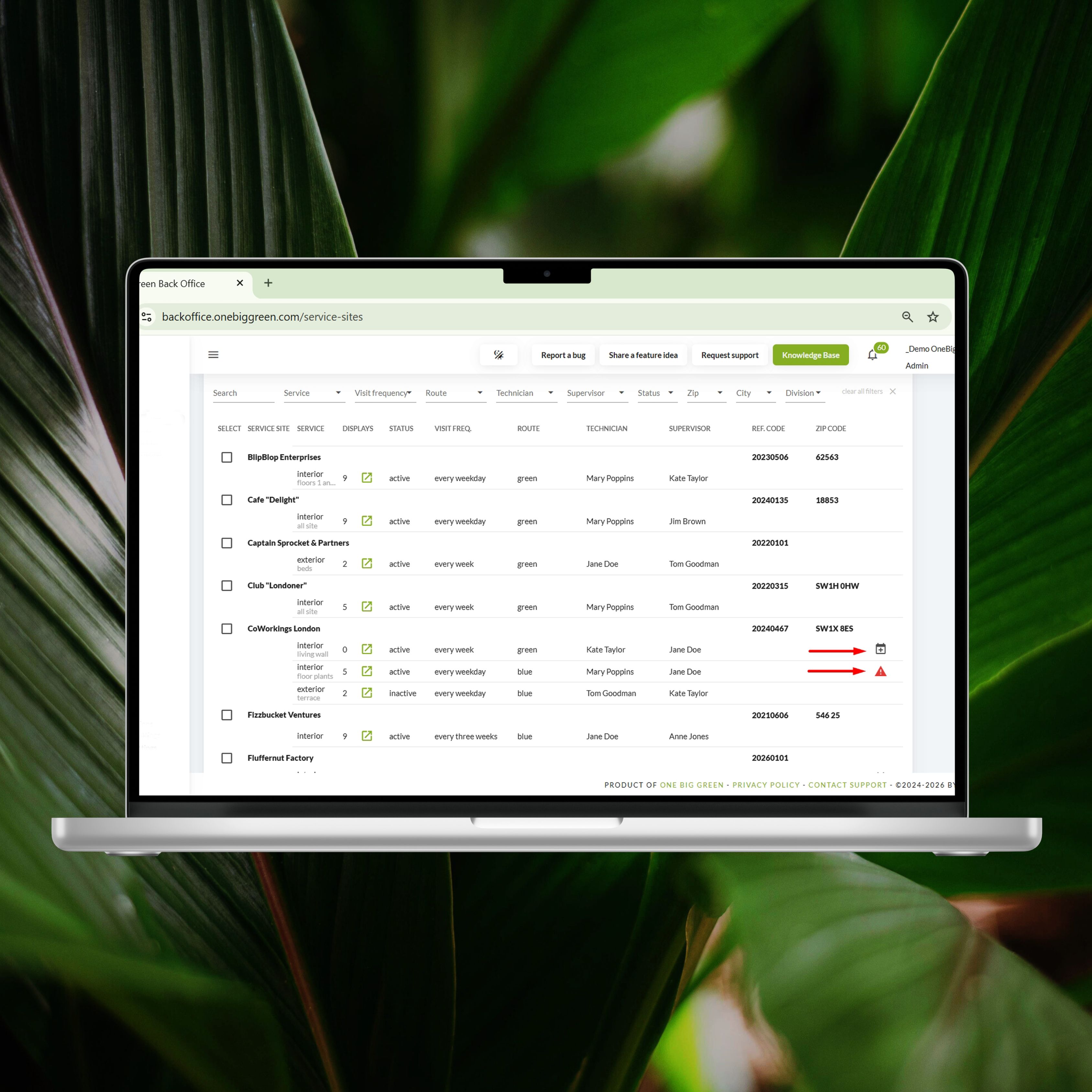
These indicators help you quickly detect duplicate schedules, inconsistent visit patterns, and configuration mistakes that could otherwise lead to missed visits or unexpected workloads.
This update turns the Service Site List into a lightweight scheduling control center. You get instant visibility, faster corrections, and fewer scheduling surprises. It is especially valuable for teams managing many sites, complex service splits, or different visit frequencies across the same account.
Link replacements to deliveries - tighter coordination for install teams
You can now link one or more replacement tickets directly to a scheduled delivery. This makes it much easier to coordinate plant replacements with your installer or delivery team, without manually compiling instructions.
When scheduling a delivery, simply select the replacement tickets you want to include from the dropdown. The system automatically attaches them to the delivery and updates the delivery instructions accordingly. Your team sees exactly what needs to be delivered, where it goes, and what the purpose of the visit is.
To make things even smoother, the site’s standard delivery instructions are automatically copied into the delivery. This gives your team consistent baseline guidance, while still allowing you to fine-tune the details for each delivery when needed.
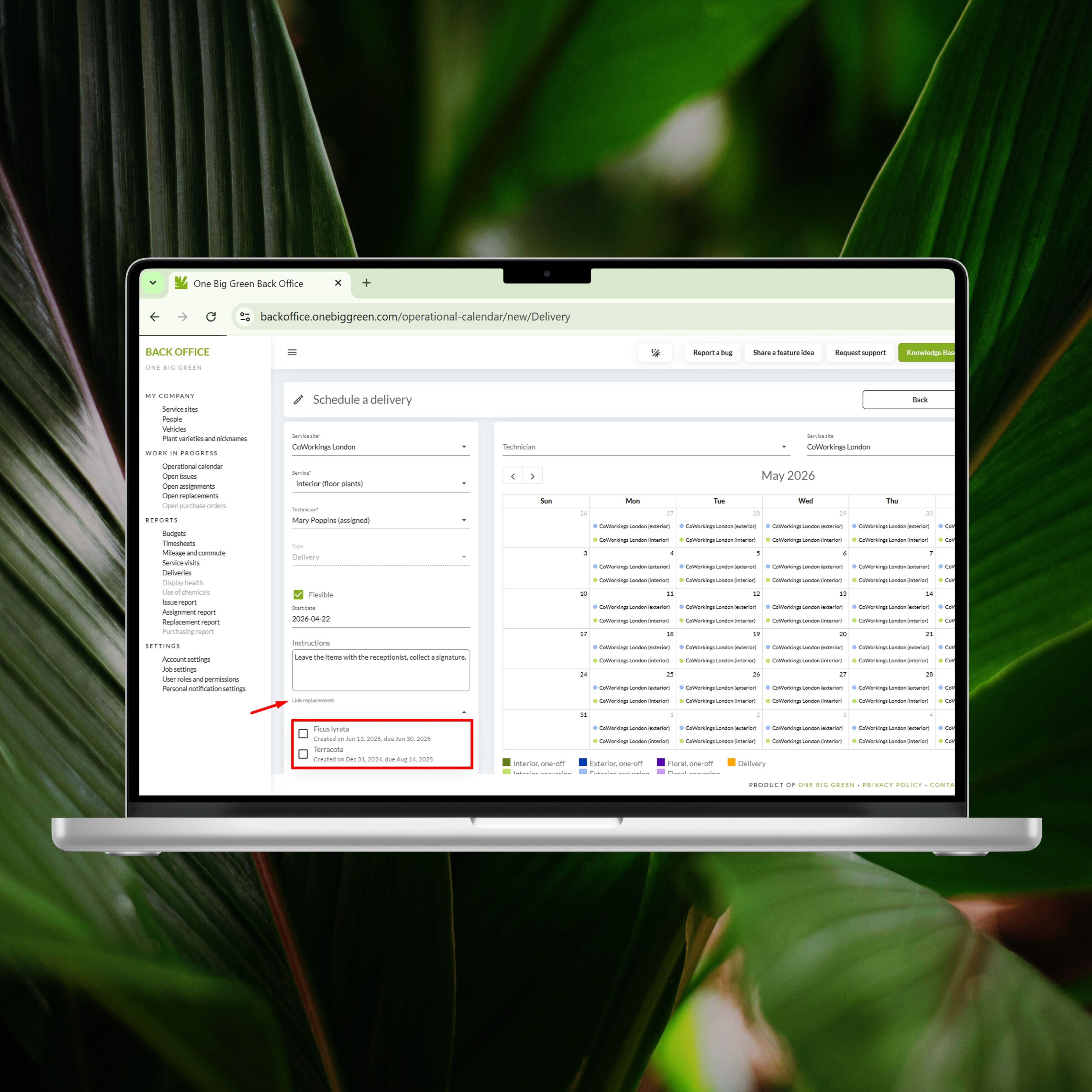
This update brings several operational benefits:
Clear connection between replacements and deliveries
Fewer manual notes and copy-paste steps
Reduced risk of missed replacement items
More structured instructions for installers
Better coordination between service and delivery teams
It is especially useful when batching multiple replacements into one delivery run, planning installer days in advance, or coordinating larger refresh projects. Everything stays connected, visible, and easy to follow for the team in the field.
Simpler team invitations - faster access for new users
We have streamlined the invitation process when adding new users to your organization. New team members no longer need to enter a verification code during signup. Instead, they simply confirm their account using a secure link sent to their email.
This small change removes friction at the most important moment, when someone is trying to get into the system for the first time. One click, and they are in.
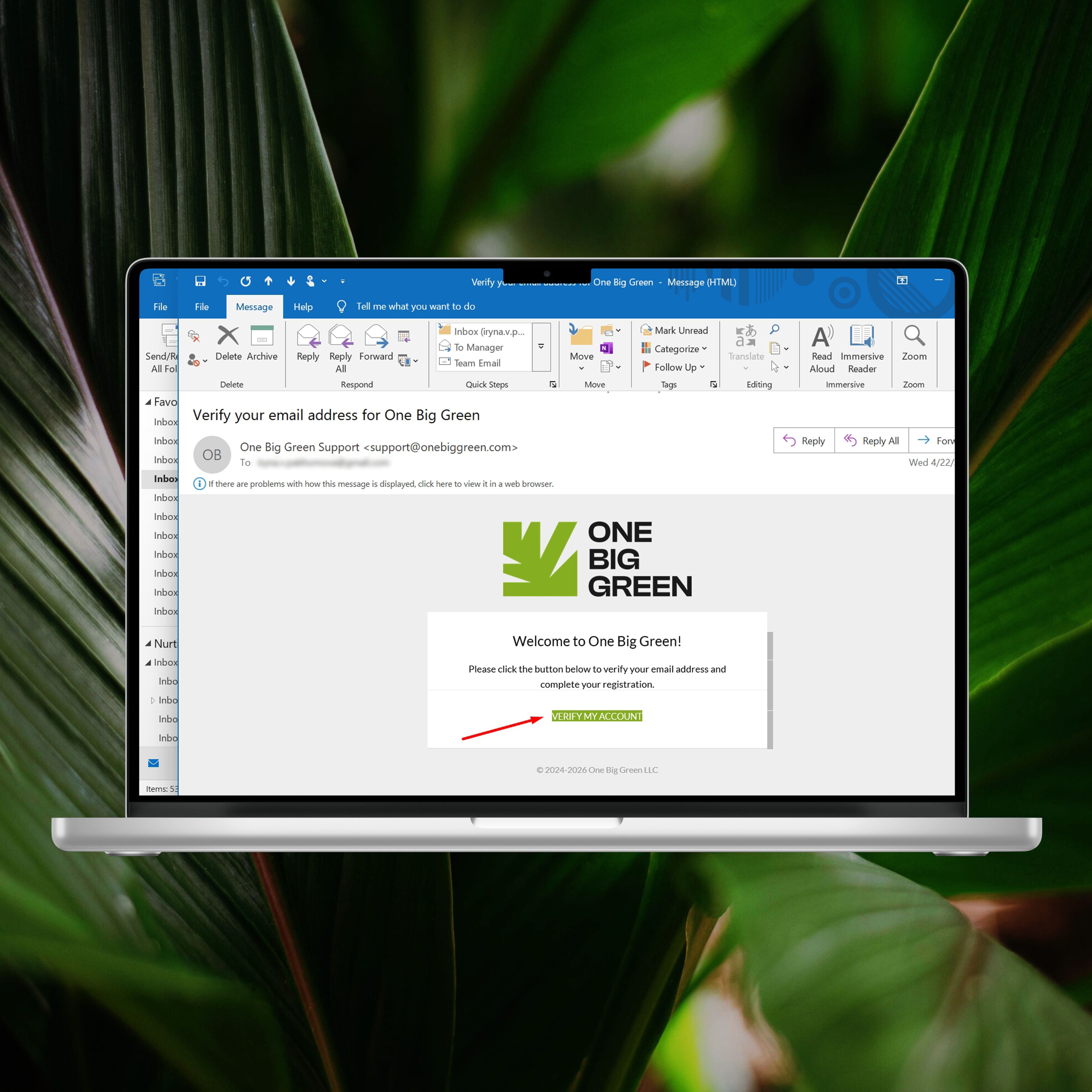
The updated flow brings several practical benefits:
Faster onboarding for new technicians and office staff
Fewer failed signups and support requests
Less confusion for non-technical users
Smoother rollout when adding multiple users at once
More reliable access from mobile devices in the field
This is especially helpful when onboarding seasonal technicians, rolling out One Big Green to a new branch, or adding users during a busy workday. Invitations become more intuitive, and new team members can start working immediately without extra steps.
Same security, fewer clicks, and a noticeably smoother onboarding experience for your entire team.
Built together with your ideas
Many of the improvements in this update started as customer suggestions. Service Nicknames, smarter scheduling visibility, delivery linking, and automated reports all came directly from real operational challenges shared by teams using One Big Green every day.
We pay close attention to these conversations. They help us understand how your service actually runs in the field and where friction still exists. That input shapes our priorities and guides what we build next.
Please keep the ideas coming. Whether it is a small annoyance, a workflow you wish existed, or a bigger concept that could transform how you operate, we want to hear it.
Your feedback continues to steer One Big Green in the right direction and helps us build a platform that truly fits the plant service industry.🌱


